I wanted to see what my local AI coding tools were actually doing (like token spend, tool calls, sessions, models) in Splunk, the same way I’d look at any other machine data. As both Claude Code and Codex can emit OpenTelemetry (OTEL), instead of scraping logs I used that to send Claude Code and Codex logs to Splunk.
This is the setup that ended up working. Two harnesses, one collector, one Splunk index (ai_usage) and two sourcetypes so I can tell them apart.
An Overview
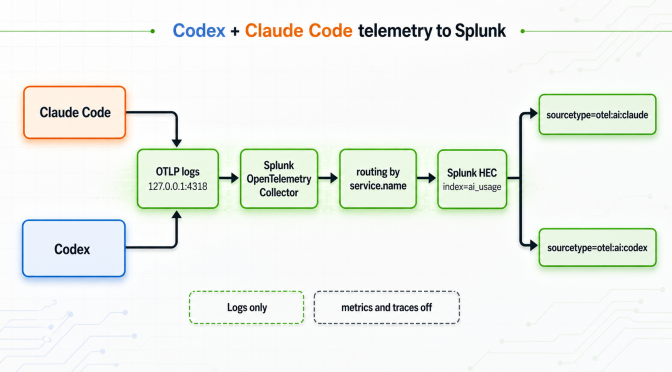
Both harnesses speak OTLP. I send both to the same collector on 127.0.0.1:4318, then split them inside the collector by service.name and export to Splunk HEC with different sourcetype values.
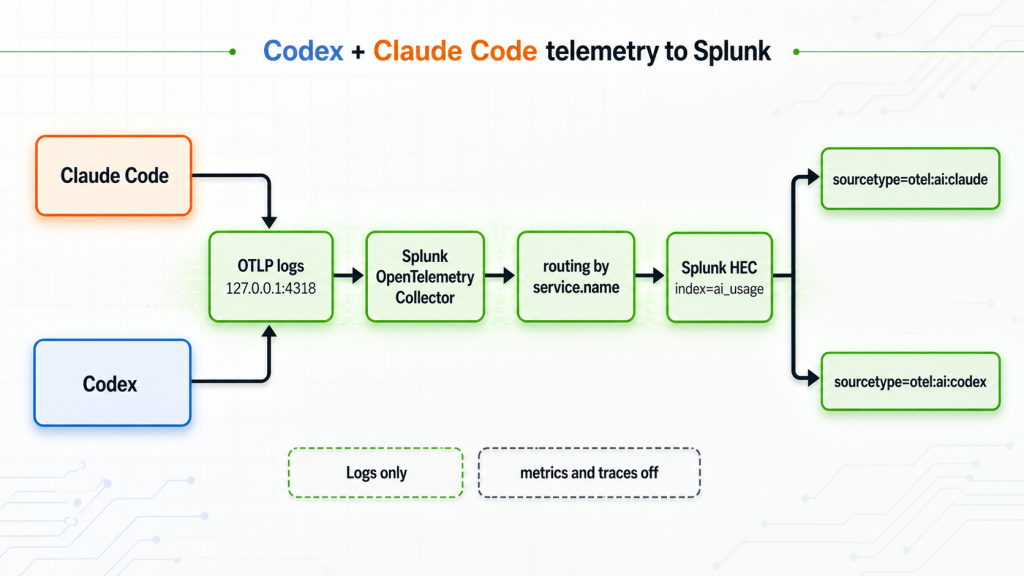
Only logs. I deliberately left metrics and traces off. The log events already have a lot of info like token counts, durations, and tool details.
Claude Code config
Claude Code is configured with env vars. Add them in ~/.claude/settings.json under env so you don’t have to export them in the shell:
{
  "env": {
    "CLAUDE_CODE_ENABLE_TELEMETRY": "1",
    "OTEL_LOGS_EXPORTER": "otlp",
    "OTEL_METRICS_EXPORTER": "none",
    "OTEL_EXPORTER_OTLP_PROTOCOL": "http/protobuf",
    "OTEL_EXPORTER_OTLP_ENDPOINT": "http://127.0.0.1:4318",
    "OTEL_LOG_TOOL_DETAILS": "1"
  }
}
Notes on the bits that matter:
CLAUDE_CODE_ENABLE_TELEMETRY=1– is the master switch. Nothing happens without it.OTEL_METRICS_EXPORTER=none– logs only, on purpose.OTEL_EXPORTER_OTLP_ENDPOINT– is just the base URL. Claude Code appends the signal path itself.OTEL_LOG_TOOL_DETAILS=1– includes which tool ran (Bash, Edit, MCP calls, etc.). That’s the part I actually care about.
Restart Claude Code after changing this, as the env block is read at startup.
Codex config
Codex config is a bit different to Claude. It’s not env vars — it’s a TOML block in ~/.codex/config.toml:
[otel]
environment = "local"
log_user_prompt = false

exporter = { otlp-http = {
  endpoint = "http://127.0.0.1:4318/v1/logs",
  protocol = "binary"
}}

trace_exporter = "none"
metrics_exporter = "none"
Two things I got wrong the first time:
endpoint– it needs the full path/v1/logs, not just the base URL like Claude. If you give it the base URL, it won’t land.protocol = "binary"is protobuf. That lines up with Claude’shttp/protobuf, so the same collector receiver handles both.
And a few other parameters worth mentioning:
log_user_prompt = false– keeps my actual prompts out of Splunk. I only want the metadata, not the text I typed.trace/metrics_exporter = "none"– self-explanatory: we don’t want metrics or traces at this point
The collector
The collector is the Splunk distro of the OTEL collector, run in Docker. docker-compose.yaml:
services:
  splunk-otel:
    image: quay.io/signalfx/splunk-otel-collector:latest
    container_name: splunk-otel-collector
    environment:
      - SPLUNK_HEC_TOKEN=<your-hec-token>
      - SPLUNK_HEC_URL=https://host.docker.internal:38088/services/collector
      - SPLUNK_CONFIG=/etc/otel/collector/agent_config.yaml
    ports:
      - "4317:4317"   # OTLP gRPC
      - "4318:4318"   # OTLP HTTP
      - "8888:8888"   # collector's own metrics
    volumes:
      - ./agent_config.yaml:/etc/otel/collector/agent_config.yaml:ro
    restart: always
The important bit is host.docker.internal in SPLUNK_HEC_URL. The collector runs in a container; Splunk runs on the host, so localhost from inside the container would be the container itself. host.docker.internal is how the container reaches the host’s 38088.
HEC port would usually be 8088, but i had it already pre-occupied with something else :-).
The routing bit
This is the part that took the most fiddling. Both harnesses hit the same 4318, but I want them tagged differently in Splunk. The collector’s routing connector does the split, keyed on service.name. agent_config.yaml:
receivers:
  otlp:
    protocols:
      grpc:
        endpoint: 0.0.0.0:4317
      http:
        endpoint: 0.0.0.0:4318

connectors:
  routing:
    default_pipelines: [logs/codex]          # anything not matched -> codex
    error_mode: ignore
    table:
      - statement: route() where IsMatch(resource.attributes["service.name"], "^claude(-|$).*")
        pipelines: [logs/claude]

processors:
  transform/normalize:
    error_mode: ignore
    log_statements:
      - set(log.time_unix_nano, log.observed_time_unix_nano) where log.time_unix_nano == 0
      - set(log.body, log.attributes) where log.attributes["event.name"] != nil
      - merge_maps(log.body, resource.attributes, "insert") where IsMap(log.body)
      - keep_keys(log.attributes, []) where IsMap(log.body)
  batch:

exporters:
  splunk_hec/codex:
    token: "${SPLUNK_HEC_TOKEN}"
    endpoint: "${SPLUNK_HEC_URL}"
    source: "codex"
    sourcetype: "otel:ai:codex"
    index: "ai_usage"
    tls:
      insecure_skip_verify: true

  splunk_hec/claude:
    token: "${SPLUNK_HEC_TOKEN}"
    endpoint: "${SPLUNK_HEC_URL}"
    source: "claude_code"
    sourcetype: "otel:ai:claude"
    index: "ai_usage"
    tls:
      insecure_skip_verify: true

service:
  pipelines:
    logs:
      receivers: [otlp]
      exporters: [routing]
    logs/codex:
      receivers: [routing]
      processors: [transform/normalize, batch]
      exporters: [splunk_hec/codex]
    logs/claude:
      receivers: [routing]
      processors: [transform/normalize, batch]
      exporters: [splunk_hec/claude]
How the routing actually resolves:
- Claude Code sends
service.name = claude-code-desktop, which matches^claude(-|$), so it goes downlogs/claude. - Codex sends
service.name = codex-app-server, which does not match, so it falls through todefault_pipelines: [logs/codex].
So Codex isn’t matched by a rule; it’s the default. That’s fine for two tools, but worth remembering: if a third thing ever sent OTLP to this collector without matching ^claude, it would get labelled as codex. The default is a catch-all, not a Codex-specific match.
insecure_skip_verify: true is because my Splunk HEC is a self-signed cert on localhost. Fine here, not something I’d do against a real endpoint.
Why the transform is there
Without transform/normalize the events landed in Splunk with an empty body and everything buried in OTEL attributes, which is annoying to search. The transform moves the log attributes into the body, merges in the resource attributes (that’s where service.name, versions, etc. live), then drops the now-duplicate attribute copy. The result is a flat JSON event where the fields are just… fields.
Testing it
Of course, after you send Claude Code and Codex logs to Splunk, you want to make sure they are there.
Quick sanity check in Splunk to see if anything is landing, and from both tools?
index=ai_usage earliest=-7d
| stats count, min(_time) as first, max(_time) as last by source, sourcetype
| eval first=strftime(first,"%Y-%m-%d %H:%M"), last=strftime(last,"%Y-%m-%d %H:%M")
In my case:
source        sourcetype        count   first             last
claude_code   otel:ai:claude    6659    2026-06-30 09:30  2026-07-07 09:16
codex         otel:ai:codex     6317    2026-06-30 09:17  2026-07-07 09:16
Both flowing, most recent event a couple of minutes old. Good enough.
A single Claude Code event looks like this (I’ve masked the user fields):
{
  "event.name": "hook_execution_complete",
  "hook_event": "PostToolUse",
  "hook_name": "PostToolUse:mcp__splunk-mcp-server__splunk_run_query",
  "service.name": "claude-code-desktop",
  "service.version": "1.18286.0",
  "session.id": "f11b6155-…",
  "total_duration_ms": "2",
  "os.type": "darwin",
  "user.email": "you@example.com"
}
And a Codex one:
{
  "event.name": "codex.websocket_request",
  "service.name": "codex-app-server",
  "service.version": "0.142.5",
  "model": "gpt-5.5",
  "conversation.id": "019f39b0-…",
  "duration_ms": "2",
  "auth_mode": "Chatgpt",
  "success": "true",
  "telemetry.sdk.language": "rust"
}
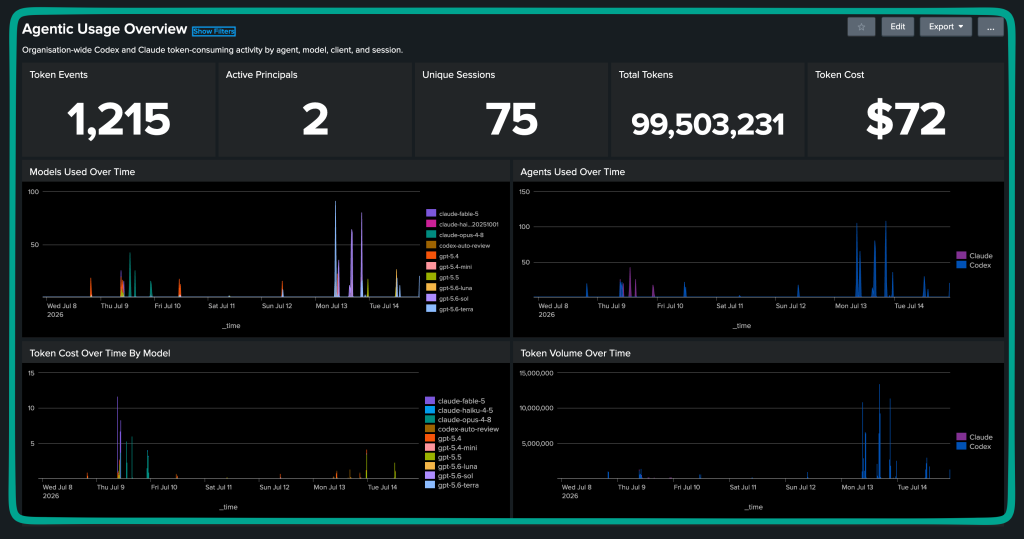
Different fields per tool are expected as they’re different products. The common keys (service.name, event.name, event.timestamp, user.email) are enough to build usage dashboards across both.
And you can have Splunk without some pretty dashboards :-)!
What I missed / gotchas
- Claude Code uses env vars, Codex uses a TOML block. I assumed both were env at first.
- Codex needs the full
/v1/logspath on the endpoint. Claude only wants the base URL. - Restart the harness after any config change. The telemetry config is read at startup, not live-reloaded.
- Codex is the default route, not a matched one. Fine for now, but the routing rule only explicitly matches Claude.
- Self-signed HEC on localhost →
insecure_skip_verify: true. Don’t carry that into anything real.
Notes
- Don’t commit the compose file with
SPLUNK_HEC_TOKENin it. My local spike had real values inline while I was testing. Before sharing the repo, move them to.envor a secret store, keep.envout of git, and rotate the token if it has already left the machine. - Metrics and traces are off here on purpose. If you want real OTEL metrics, not dashboard metrics derived from log events, flip
OTEL_METRICS_EXPORTER/metrics_exporterback on and add a collector metrics pipeline. The log events already carry what I needed for this dashboard. - Telemetry field names can change between versions. This worked on the versions listed at the top; check the current field names if a dashboard suddenly goes empty after an update.
- Pin the collector image before turning this into a repeatable setup.
splunk-otel-collector:latestis fine for a spike, but it makes blog instructions drift over time.
References
- Codex config reference: https://developers.openai.com/codex/config-reference
- Claude Code monitoring: https://code.claude.com/docs/en/monitoring-usage
- Splunk OpenTelemetry Collector docs: https://help.splunk.com/en/splunk-observability-cloud/manage-data/splunk-distribution-of-the-opentelemetry-collector/get-started-with-the-splunk-distribution-of-the-opentelemetry-collector
- Splunk HTTP Event Collector event format: https://help.splunk.com/en/splunk-enterprise/get-data-in/get-started-with-getting-data-in/10.0/get-data-with-http-event-collector/format-events-for-http-event-collector
- OpenTelemetry Collector Splunk HEC exporter: https://github.com/open-telemetry/opentelemetry-collector-contrib/tree/main/exporter/splunkhecexporter