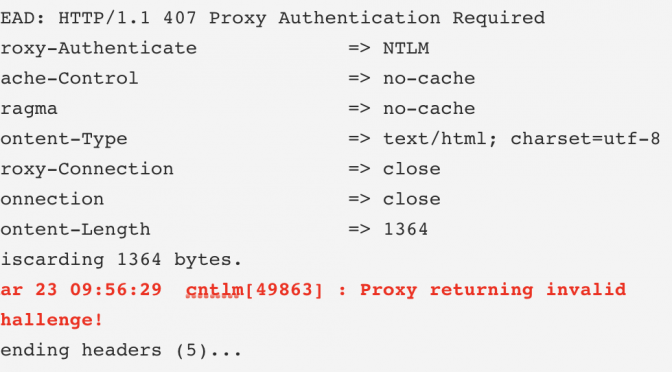
After setting up Cntlm on my new MAC at work and trying it for the first time I’ve got a “Proxy returning invalid challenge” error.
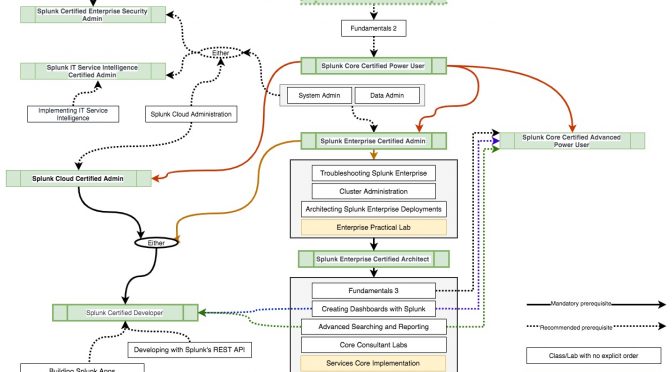
Splunk Certification Tracks
So here is my understanding of the current Splunk Certification Tracks.
Of course you can go to the “source” https://www.splunk.com/en_us/training.html , but may be that visual representation will help someone
Continue reading Splunk Certification Tracks

Using goss and Ansible templates for System Testing
Here is how we have used goss and Ansible templates to run system tests after building syslog-ng servers
Continue reading Using goss and Ansible templates for System Testing
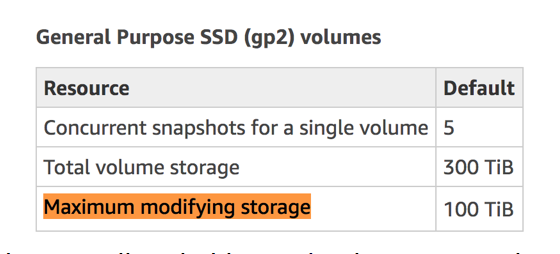
AWS VolumeModificationSizeLimitExceeded
If you are dealing with big amounts of EBS volume and need to extend it you might face one day an AWS VolumeModificationSizeLimitExceeded error.
Ansible – loop over netsted variables
I’ve started using Ansible at my work, where we use it to deploy Splunk environments.
One of the things I needed to do is to provide a list of tcp ports to a “with_items” statement in a form of list.
Continue reading Ansible – loop over netsted variables
Splunk – List REST API users and their IPs
Want to get a list REST API users and their IPs?
Run this search
index=_internal
host IN(SH1,SH2,SH3)
sourcetype=splunkd_access
user != "-"
clientip != "IP_of_SH1" clientip != "IP_of_SH2" clientip != “IP_of_SH3”
NOT TERM(127.0.0.1)
NOT TERM(splunk-system-user)
| stats values(clientip) by user
The limitation is if the users are going via a Load Balancer, you will see Load Balancer’s IP as the clientip

Use Glide to create a catalog of books and movies from the Tim Ferris blog
So I was playing with web scraping a couple of years ago and scraped the list of Books, Movies and other items mentioned in Tim Ferris Blog and Podcast and yesterday I’ve somehow stumbled on the Glide. So I thought to myself, “why not try to use Glide to create a catalog of books and movies from the Tim Ferris blog?”
Continue reading Use Glide to create a catalog of books and movies from the Tim Ferris blog

Notes from SplunkLive! Sydney 2019
Notes from SplunkLive! Sydney 2019
I’ve had a chance to got SplunkLive! in Sydney this year.

It was freezing (by Sydney standards) 7.6 with winds which felt like -0.2 according to weatherzone app on my phone and my face.
So I wouldn’t have minded if the event turned out to be a total disaster, as long as they would have served coffee and it was warm inside, but it turned out to be quite interesting.

Python – Test Network Connection
The below will return True/False
import socket

def test_connection(host="8.8.8.8", port=53, timeout=3):
  try:
    socket.setdefaulttimeout(timeout)
    socket.socket(socket.AF_INET, socket.SOCK_STREAM).connect((host, port))
    return True
  except Exception as ex:
    #print ex.message
    return False


destination_host = "mymachine.company"
destination_port = 9997
timeout = 2
test_result = test_connection(destination_host, destination_port, timeout)
Or you can use this version to return the Exception in case connection has failed
import socket

def test_connection(host="8.8.8.8", port=53, timeout=3):
  try:
    socket.setdefaulttimeout(timeout)
    socket.socket(socket.AF_INET, socket.SOCK_STREAM).connect((host, port))
    return True, None
  except Exception as ex:
    #print ex.message
    return False, ex.message


destination_host = "mymachine.company"
destination_port = 9997
timeout = 2
test_result, ex = test_connection(destination_host, destination_port, timeout)
Python – Get local machine IP
Here is how to use Python – to Get local machine IP
import socket

def get_ip():
    s = socket.socket(socket.AF_INET, socket.SOCK_DGRAM)
    try:
        # doesn't even have to be reachable
        s.connect(('10.255.255.255', 1))
        IP = s.getsockname()[0]
    except:
        IP = '127.0.0.1'
    finally:
        s.close()
    return IP